TopstepX futures, journaled properly
Futures traders have been stuck with journals that count one position as three trades. Retrace now imports and auto-syncs TopstepX — reconstructing real positions, matching your statement to the cent.
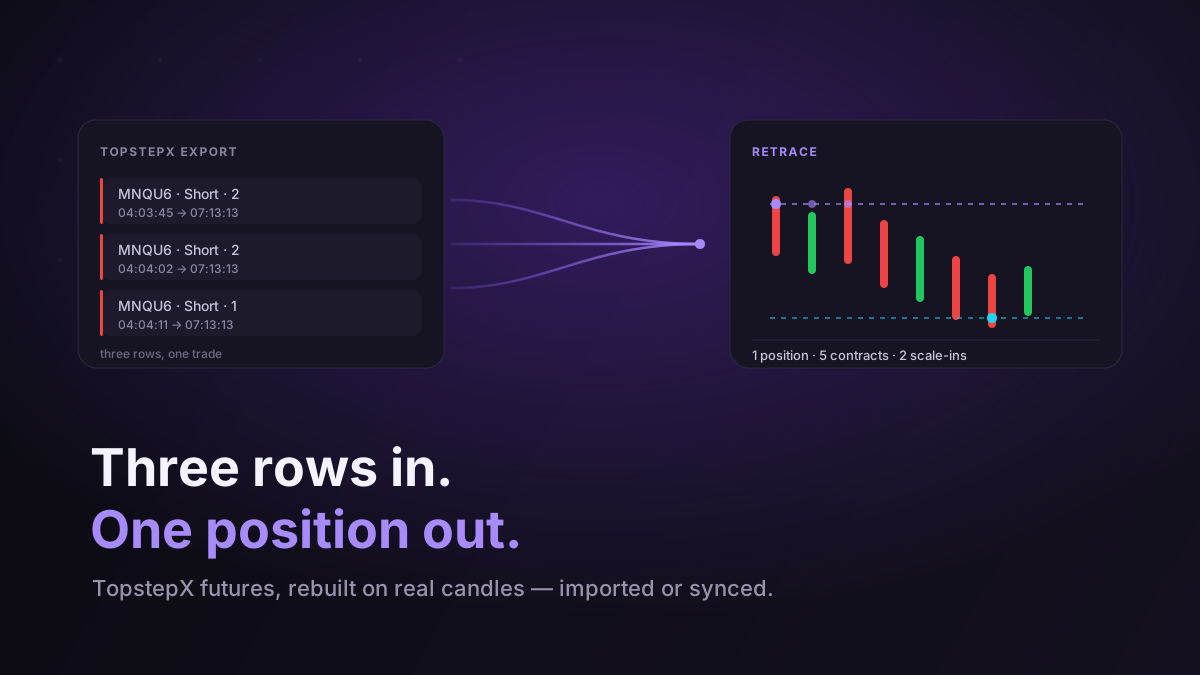
If you trade futures at Topstep — or any of the prop firms running the ProjectX gateway — you have probably given up on journaling at some point. Not because you did not want the data, but because every tool you tried got the data subtly wrong, and a journal you cannot trust is worse than no journal at all.
Retrace now supports TopstepX both ways: import the CSV, or connect the account and let it sync itself. Both are free. What follows is less an announcement than an explanation of what was actually hard about it, because the hard parts are exactly the parts that make a futures journal wrong.
Your broker does not export positions. It exports entry lots.
Open a TopstepX trades export and each line looks like a trade. It is not. TopstepX writes one row per entry lot, not per position.
Say you short two MNQ, add two more a few seconds later as it goes your way, then add a final one, and close all five together. You traded once. The export shows three rows, all with the same exit timestamp, each with its own entry price and its own slice of the P&L.
Drop that into a generic journal and you have three trades. Your trade count is inflated, your average position size is wrong, and your win rate is computed over rows that were never independent decisions. Worse, the day you scaled into a loser three times now looks like three separate bad trades rather than the single sizing decision it actually was — which is the thing you most needed to see.
Retrace nets those rows back into one position. Entry becomes the volume-weighted average, the adds become scale-ins on the chart, and a partial close in the middle stays a partial close. In our own test file, 42 exported rows were 33 actual positions. Eight of them were scale-ins, and one was a position that had been added to twice with a partial close in between — a single trade the export had spread across three lines.
The P&L column is not the number on your statement
This one is quieter and costs you more.
The PnL column in a TopstepX export is gross. Fees are not in it. So if you sum that column you get a number that is meaningfully better than what your account actually did, and you will believe it because it came out of the broker.
There is a second trap right next to it. The export has both a Fees column and a Commissions column, and the obvious move — add them together — is wrong. Commissions is a component of Fees, not an additional charge. On MNQ the fee is $0.72 a contract, of which $0.50 is commission and the rest is exchange and clearing. Add both and you have double-charged yourself the commission on every single trade.
Retrace stores the net figure: gross P&L minus total fees, with the fees kept separately so you can still see them. On our test file that is $1,382.00 gross, $89.28 in fees, $1,292.72 net — which is the number Topstep shows you. Your journal and your account agree, which is the entire point.
Contract months would fragment your stats four times a year
Futures symbols carry their expiry. The September 2026 Micro Nasdaq is MNQU6; in December it becomes MNQZ6. Same instrument, same setup, same you — different ticker.
A journal that takes the symbol literally splits your MNQ statistics into a new bucket every quarter. After a year you have four partial records of one instrument and no way to answer "how do I actually trade the Nasdaq?"
Retrace stores the root. MNQU6 and MNQZ6 are both MNQ, so your stats run continuously across every roll and the charts keep working afterwards.
Connecting, and why there is nothing to register
You can import a CSV whenever you like. But the reason we built the connector is the same reason we built the cTrader one: the journal that survives is the one that does not depend on you remembering to feed it.
Connecting TopstepX is deliberately unglamorous. There is no OAuth redirect and no application to register, because ProjectX does not have one — you generate an API key in your own TopstepX dashboard (Settings → API Access), paste it into Retrace with your username, and every trading account that key can see gets linked at once.
A few things worth stating plainly:
- It is read-only. The connection can see your trade history. It cannot place an order, close a position, or move money. There is no permission level at which it could.
- You hold the off switch. Revoke the key in your TopstepX dashboard and the connection is dead immediately, with nothing to cancel on our side.
- The key is encrypted at rest, and it is the only credential stored — we never see your password.
- It keeps itself current. Once connected, new trades arrive on their own in the background. Close a position and it turns up in your journal shortly after, already charted.
- Some firms gate API access behind a plan or an account type. If your key will not authenticate, that is usually why, and it is between you and your firm rather than something we can enable.
Charted, like everything else
Whichever way the trades arrive, they get the same treatment as every other source. Each position is drawn on real candles with its entry, its scale-ins, every partial and its exit marked in place, across timeframes. That is what turns "I scaled into a loser again" from a vague memory into something you can look at.
And because the positions are reconstructed properly, the analytics underneath them mean something. Expectancy per setup, R-multiples, the calendar, the equity curve — all of it is computed over real positions with real net P&L, not over export rows.
If you also trade something else
Nothing here is exclusive. A cTrader account and a TopstepX account can sit side by side, each with its own balance and its own stats, and the account switcher shows you either one or everything combined. MetaTrader statements import into the same model. Futures, FX, indices, metals — one journal.
If you have been keeping your futures trading in a spreadsheet because nothing handled it properly: export a CSV and import it, or connect the account and let it fill itself in. Both are on the free plan, and there is no card required to find out whether the numbers finally match.