Every trade you take, already on the chart.
Connect cTrader or TopstepX once and Retrace rebuilds each position on real candles — entry, stop, take-profits and every partial, across every timeframe. No CSV exports, no screenshots. Prefer MetaTrader? Drop in an MT4/MT5 statement and it charts the same way.
- Free plan, no card required
- cTrader & TopstepX auto-sync
- Replay practice, free daily
- MetaTrader import
- Your data stays private
Works with your broker
Your journal, synced from your broker automatically
Importing statements is a chore you forget to do — so your journal falls behind exactly when you need it. Connect cTrader or TopstepX once and Retrace keeps itself up to date, so every review is on your real, complete trade history. It's included free, with no card required.
Connect once, forever after
A secure cTrader sign-in, or a read-only TopstepX API key. No password shared, no file to export. New trades appear on their own, usually within minutes of the position closing.
Kept up to date in the background
Retrace re-syncs your account on a schedule and picks up right where it left off, so your journal is always current without you lifting a finger.
Read-only and revocable
The connection only ever reads your trade history. It never places orders or touches your funds, and you can disconnect any time.
MetaTrader 4 & 5 supported too, via statement import.
See exactly how the trade played out
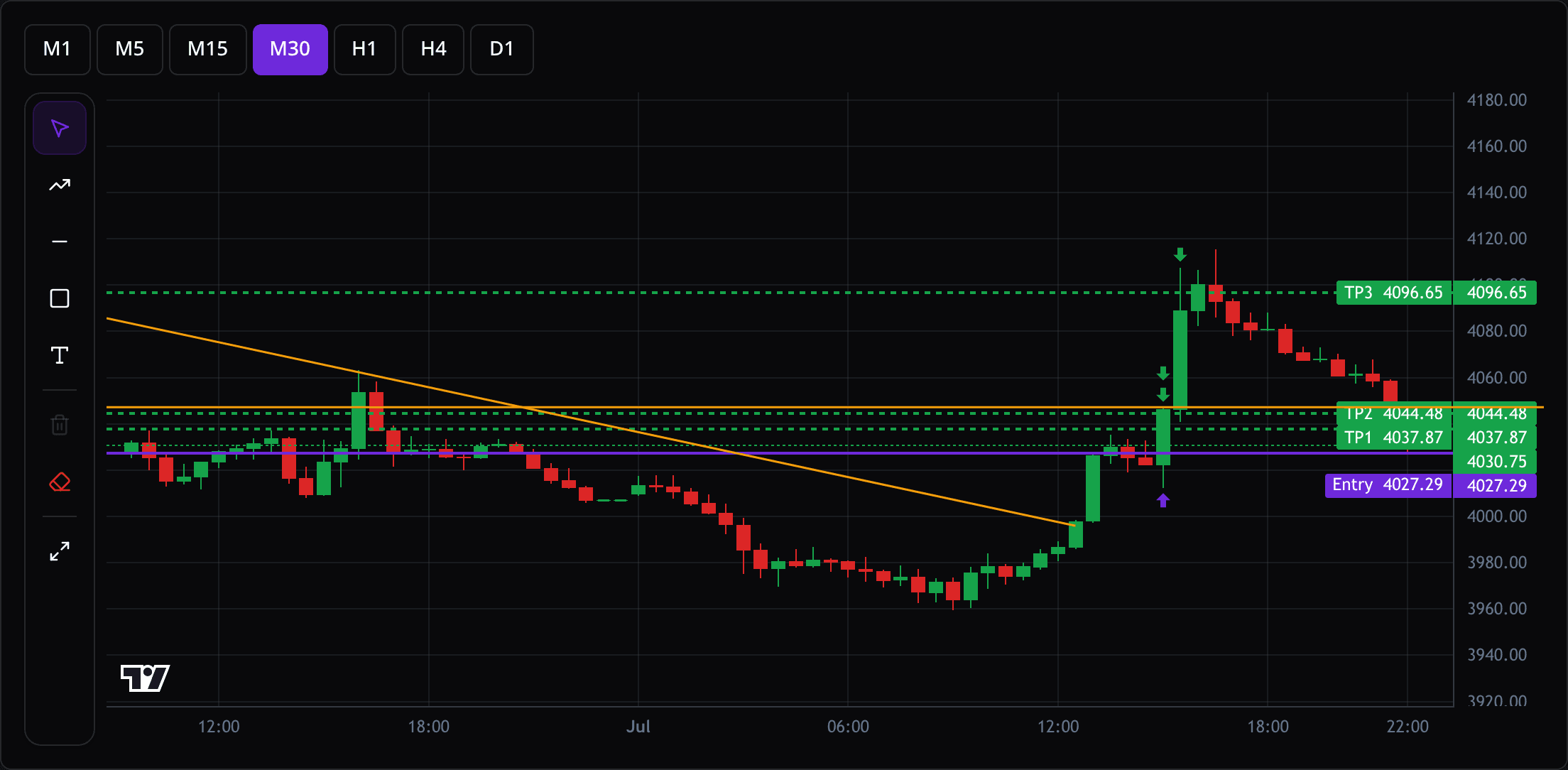
Every fill is reconstructed on real spot candles aligned to your broker's clock. Entry, stop and take-profits become labelled price lines; scale-ins and partial closes become arrows on the exact bar they happened — no manual charting, no screenshots.
- Entry / SL / TP1–TPn drawn like an order ticket
- Partial closes & scale-ins reconstructed automatically
- M1 to D1 — switch timeframes on the same trade
- Draw your own trendlines and notes, saved per trade
Know your edge, not just your P&L
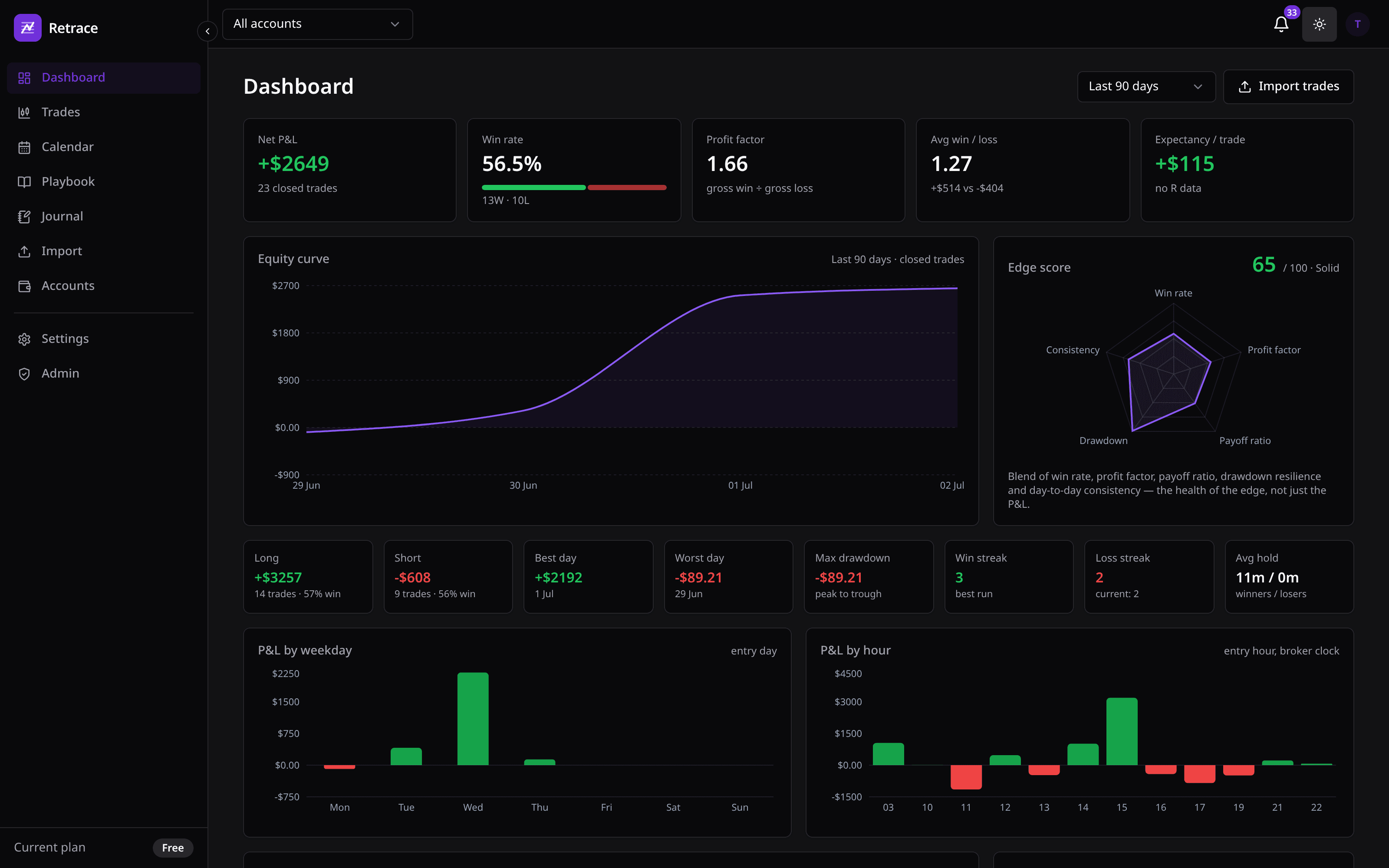
An honest read on your trading: equity curve, profit factor, expectancy, an Edge Score that blends win rate, payoff and drawdown resilience, plus where your money actually comes from — by weekday, by hour, long vs short.
- Edge Score — the health of your strategy at a glance
- P&L by weekday & hour to find your real edge windows
- Long vs short, streaks, drawdown, hold times
- Scope to one account or all your live / demo / prop accounts
A calendar that shows the money
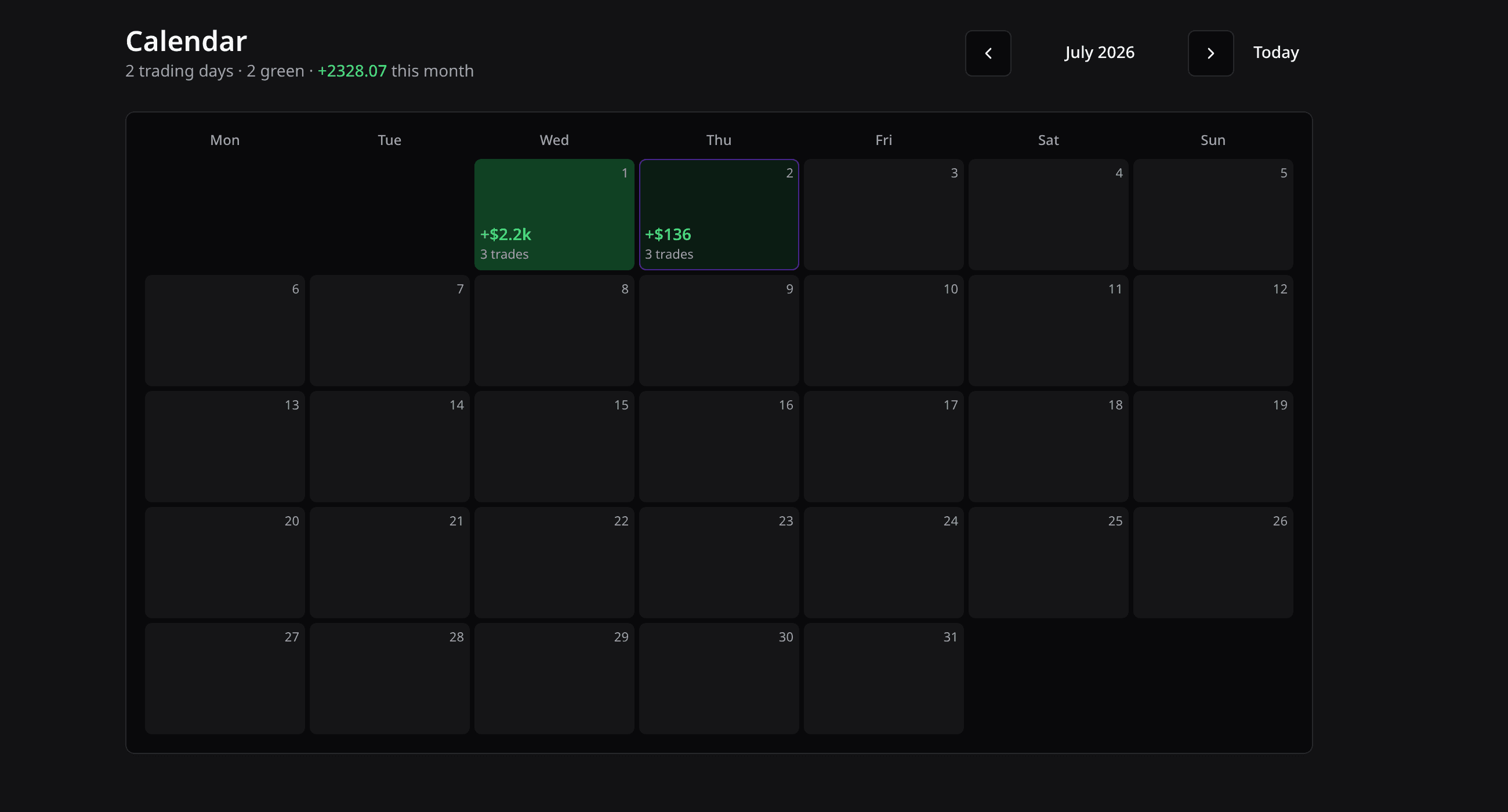
Your month at a glance — green and red days sized by P&L, click any day to see its trades and write how the session went. Journaling that takes seconds and compounds over time.
- Colour-coded P&L calendar, click through to any day
- Per-day notes and a mood tag on every trade
- Screenshots attached to each trade, right on the chart
- Bounce a day's trades against how you felt taking them
Find the setup that actually pays — then show it
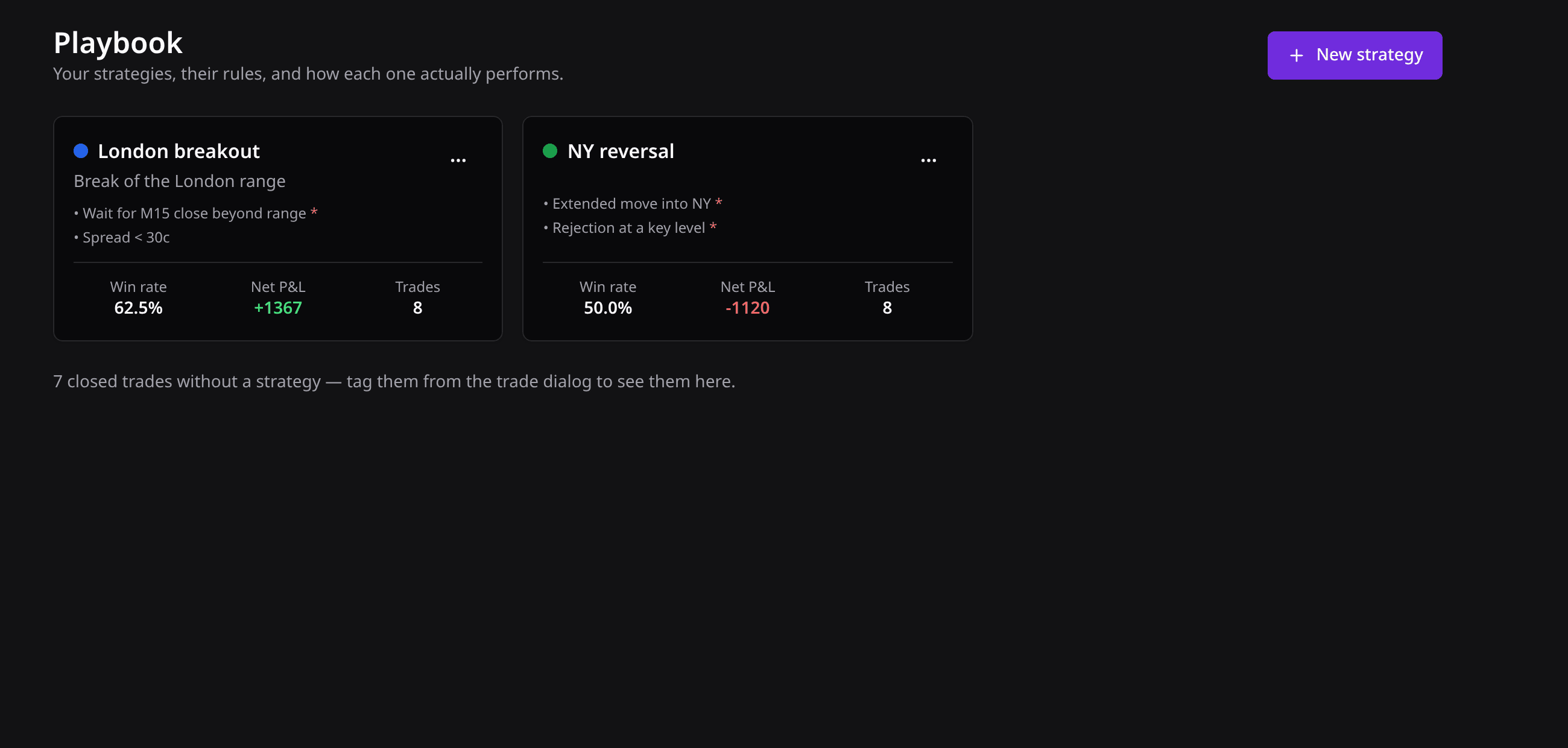
Build a playbook of your strategies with an entry checklist, tag every trade to one, and Retrace tells you which setup earns and which just keeps you busy. When a trade is worth showing, share it with a private link — the full chart, read-only, revocable.
- Per-strategy win rate, profit factor and expectancy
- An entry checklist so you trade the plan, not the feeling
- Share any charted trade with a mentor or your community
- Draw trendlines and notes on the shared chart — perfect for coaching
Practise on days that already happened
Knowing what a setup looks like afterwards has almost nothing to do with recognising it while it forms. Replay plays a real trading day back to you one candle at a time — real bank-feed prices, the future hidden — and lets you trade it with play money. Pause to think, step one candle at a time, or run it at 20× through the quiet hours.
Start where the day gets interesting
No scrolling back through dead hours to find the move. Pick a market and a date, jump straight to the Asia, London or New York open, and the first candle on screen is the one that mattered.
Trade it like it's live
Buy or sell with a stop and a target, then drag them on the chart with a mouse or your thumb. Set a second target and half the position banks there while the rest runs. Stops fill candle by candle, exactly as they would have.
Scored in R, not in dollars
Every session is measured in risk units, so a day practised on a $1,000 balance and one on $100,000 compare honestly. Win rate, average R and profit factor across every replay you've ever run.
Three a day, each a full trading day. Pro is unlimited.
Everything a journal should do for you
Built for traders who want the review, not the data entry.
Broker auto-sync — free
Connect cTrader or TopstepX once and every trade flows in automatically, kept up to date in the background. No CSV exports. Trading MetaTrader? Import an MT4/MT5 statement — it charts the same way.
Auto-charting on real candles
Every trade is drawn on real spot-price candles: entry, stop loss, take profits and partials — reconstructed from your fills, across every timeframe.
Replay — practice on real past sessions
Pick a market, a day and a session open, then trade it candle by candle at your own speed with play money. Stops, targets and P&L, exactly like live — without the risk.
Calendar P&L & daily journal
See your month at a glance, then click any day to write how the session went. Daily notes, per-trade notes and a mood tag turn numbers into a story you can learn from.
Playbook & strategy stats
Tag trades to strategies and get per-strategy stats — win rate, expectancy, R-multiples — so you know what actually works.
Share trades by link
Send a charted trade to a mentor or community with a public link. Add drawings and notes right on the chart.
Multi-account
Track live, demo and prop-firm accounts side by side, grouped the way you trade — with stats per account or combined.
How it works
From a connected account to a fully charted journal in three steps.
- 1
Connect your broker
Link cTrader with a secure sign-in, or TopstepX with a read-only API key — a couple of clicks either way, and no password shared. On MetaTrader instead? Import an MT4/MT5 statement with our step-by-step guides.
- 2
Trades sync automatically
Retrace pulls your history and keeps it up to date in the background. Partial closes are reconstructed into complete positions, everything is deduplicated and matched to the right account — no manual entry, ever.
- 3
Review & improve
Every trade appears fully charted on real candles. Browse your calendar P&L, journal the day, compare strategies in your playbook, and study R-multiples, MAE and MFE to sharpen your edge.
Built for how you actually trade
Retrace is made for discretionary traders who want an honest, automatic record — not another spreadsheet to maintain.
Prop-firm & challenge traders
Trading an FTMO-style challenge lives and dies on consistency. Track risk in R, watch your daily and max-drawdown headroom, and prove — trade by trade — that your edge survives the rules.
Forex & gold traders
XAUUSD and FX move fast and reprice on news. See exactly which session and setup makes your money, and which one quietly gives it back, on real candles aligned to your broker's clock.
Multi-account traders
Live, demo and several prop accounts at once? Keep them side by side, grouped the way you trade, with clean stats per account or combined across all of them.
Simple pricing
Start free. Upgrade when your journal outgrows it.
Free
Everything you need to start journaling.
$0 / month
- Broker auto-sync — 1 connected account
- Full auto-charting on real candles
- Analytics, Edge Score & calendar
- Daily journal, notes & mood tags
- 4 strategies in your playbook
- Unlimited share links
- Replay — three practice sessions a day
Pro
or $90/yrEverything unlimited, for power users and multi-account traders.
$9 / month
- Everything in Free
- Unlimited connected accounts
- Unlimited strategies
- Unlimited Replay sessions
- MetaTrader import included
- Priority support
Frequently asked questions
How does the free auto-sync work?
You connect your cTrader account with a secure sign-in, or your TopstepX account with a read-only API key you generate yourself — no password is shared with us either way. Retrace then pulls your trade history and keeps it up to date automatically in the background, so your journal is always current without importing anything. The connection is read-only: it can never place orders or move funds.
Which brokers and platforms are supported?
Any broker that runs on cTrader, MetaTrader 4 or MetaTrader 5. cTrader and TopstepX connect directly for automatic sync; for MetaTrader you import an MT4/MT5 HTML statement, and it charts exactly the same way. TopstepX also exports a CSV if you would rather import than connect.
Is there a free plan, and how much is Pro?
Yes — the free plan includes cTrader auto-sync for one connected account, full auto-charting, analytics and journaling, with no card required. Pro unlocks unlimited connected accounts and strategies for $9/month or $90/year. Auto-sync is free on both plans.
Where do the candles come from?
From a real spot-price feed, aligned to your broker's server clock. Your trades are drawn on the same candles you traded, not on approximations.
Can I practise without risking money?
Yes — that's what Replay is for. Pick a market and any past trading day, jump straight to the Asia, London or New York open, and the session plays back one candle at a time with the future hidden. You trade it with play money: stops and targets fill candle by candle just as they would have, and the session is scored in R so results compare across different practice balances. The free plan includes three full sessions a day; Pro is unlimited. Nothing you do in Replay touches your journal or your broker.
Is my data private?
Yes. Your trading data is yours: it is never shared unless you create a public share link yourself, and you can delete your data at any time.
Does it handle partial closes?
Yes — that's the point. Partial fills and scale-outs are reconstructed into a single position, with each partial drawn on the chart and reflected in your R-multiple stats.
Connect your broker and see your edge
Link your account and watch every trade chart itself on real candles. Free plan to start — no card required.